What Is Multi-Factor Authentication (MFA) and Why It Matters

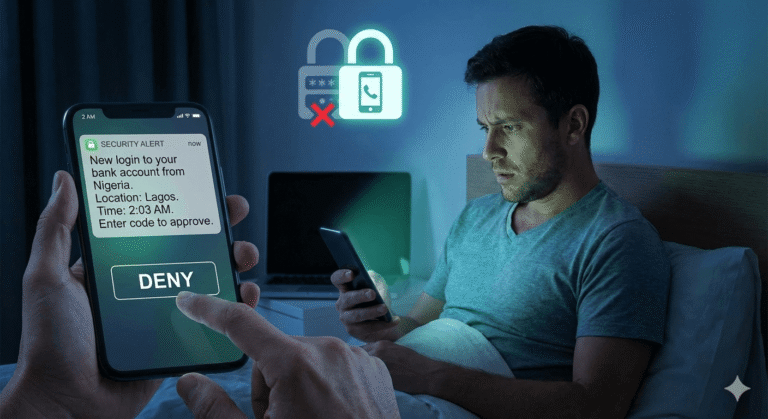
Kevin’s phone buzzed at 2 AM. “New login to your bank account from Nigeria.”
He sat up fast. He hadn’t been to Nigeria. He hadn’t even been on his computer. But his password had been stolen in a data breach three months ago. A breach he didn’t even know about.
The login failed. The criminal had his password, but they didn’t have the second thing Kevin’s bank required: the code sent to his phone.
That second step. That extra barrier is what saved Kevin $43,000.
This is multi-factor authentication in action. This is one of the most powerful tools you have to protect yourself online.
What MFA Actually Means (In Plain English)
Multi-factor authentication, often called MFA or two-factor authentication (2FA), is simply proving who you are in more than one way before you can access an account.
Instead of just entering a password, you provide a second piece of proof. Maybe it’s a code sent to your phone. Maybe it’s your fingerprint. Maybe it’s a notification you have to approve on an app.
Think of it like your house. A password is like a key. But MFA is like having a key AND a security code you need to enter once you’re inside. A criminal might pick your lock, but they still can’t get past that second barrier.
According to Microsoft, their systems face over 1,000 password attacks every single second. That’s not a typo. Every second, criminals are trying to break into accounts. But here’s the critical part: more than 99.9% of the accounts that get hacked don’t have MFA turned on.
Let that sink in. Simply turning on MFA blocks almost every attack.
How MFA Actually Works
The process is simpler than you might think.
Step 1: You enter your username and password. This is what you know, which is the first piece of proof.
Step 2: The system asks for something else. This could be:
- A code texted to your phone
- A notification on an app that you tap to approve
- Your fingerprint or face scan
- A code from a small device you carry
Step 3: If both pieces match, you’re in. If even one is wrong or missing, access is denied.
Here’s why this matters: even if someone steals your password from a data breach (and millions of passwords leak every year), they can’t get into your account without that second factor. They don’t have your phone. They don’t have your fingerprint. They’re stuck.
The U.S. Cybersecurity and Infrastructure Security Agency (CISA) puts it simply: MFA users are less likely to be hacked.
The Three Types of Proof You Can Use
Security experts talk about three categories of authentication factors. Don’t worry, the categories are simple:
Something you know: Your password, a PIN, or the answer to a security question. This is the traditional way we’ve always logged in, but it’s also the weakest because passwords can be stolen or guessed.
Something you have: Your phone, a special USB key, or an app that generates codes. This is harder for criminals to steal because they’d need physical access to your device.
Something you are: Your fingerprint, your face, your voice, or even how you type. These are called biometrics, and they’re nearly impossible for someone else to fake.
The strongest protection combines at least two of these categories. For most people, that means a password (something you know) plus a code sent to your phone (something you have).
Real-World Examples You’ve Probably Seen
You might already be using MFA without realizing it. Here are common examples:
At the ATM: You need your card (something you have) and your PIN (something you know). That’s MFA.
Online banking: You enter your password, then the bank texts a code to your phone. That code expires in a few minutes, making it useless to criminals who don’t have your phone.
Your iPhone: If you use Face ID or Touch ID along with your passcode, you’re using MFA.
Work email: Many companies now require employees to approve login attempts through an app on their phone. You get a notification asking, “Are you trying to log in?” and you tap yes or no.
Why MFA Matters More Than Ever
The numbers reveal a chilling picture about online crime:
According to IBM’s 2024 report, the average cost of a data breach is $4.88 million, which was a 10% increase from the previous year. That’s not just big companies losing money. Real people are losing access to their bank accounts, family photos, work files, and identities.
Here’s what makes this worse: it takes organizations an average of 270 days to identify and contain a breach. That’s nine months where your information could be floating around on the dark web (essentially a digital black market) before anyone even knows it was stolen.
But MFA changes everything. Research shows that adding MFA can block over 99.9% of account compromise attacks. It also stops 96% of bulk phishing attempts and three out of four targeted attacks.
Let those statistics sink in for a moment. Nearly every attack is stopped by this one simple step.
The Real Cost of Not Using MFA
Janet worked in accounting for a small medical practice. One morning, she received an email that looked like it was from her boss: “We need to process this payment immediately. Use the attached wire transfer form.”
She clicked the attachment. It looked legitimate. She entered her login credentials to access the payment system.
Within hours, criminals had transferred $127,000 from the practice’s account. The email wasn’t from her boss. The form was fake, and because the payment system didn’t require MFA, the criminals walked right in using Janet’s stolen credentials.
The practice eventually recovered some of the money, but not all of it. Janet kept her job, since the breach wasn’t her fault, but most importantly, if MFA had been turned on, they would have needed a phone to approve the transfer. They would have been stopped.
According to recent industry research, nearly two-thirds of small and medium-sized businesses don’t use MFA. Meanwhile, 67% of companies had MFA implemented across their systems by 2024, up from 56% in 2022.
The gap is closing, but too slowly. Every day without MFA is a day your accounts are vulnerable.
Common Types of MFA You’ll Encounter
Text message codes (SMS): The most common type. You get a 6-digit code texted to your phone that you enter within a few minutes. While this is better than no MFA at all, it’s not the most secure option because criminals have found ways to intercept text messages.
Authenticator apps: Apps like Google Authenticator and Microsoft Authenticator generate codes on your phone even when you don’t have cell service. According to user preference data, 41% of users prefer SMS-based verification, while 28% use authenticator apps. Authenticator apps are more secure than SMS and just as easy to use.
Push notifications: You get a notification on your phone asking you to approve the login. You just tap “yes” or “no.” This is simple and secure. Research shows that 29% of organizations use push notifications, making them the most popular authentication factor after passwords.
Biometrics: Your fingerprint, face scan, or voice recognition. The use of biometrics is growing fast. Biometric methods such as fingerprint and facial recognition rose to 21% in 2024 from 12% in 2022. These are incredibly secure because they’re unique to you.
Hardware keys: Small USB devices you plug into your computer to prove who you are. These are the most secure options and are popular among people who need extra protection, such as journalists or executives handling sensitive information.
“But MFA Is Annoying”
Let’s be honest. You’re thinking it. A lot of people think it.
You’re right, MFA adds an extra step. It takes a few more seconds to log in. Yes, sometimes your phone is in the other room, and you have to go get it.
Research confirms this frustration. In a survey, 33% of respondents said MFA was annoying, 23% found it too complex, and another 23% found it too slow.
But here’s the thing: those extra ten seconds could save you thousands of dollars and months of stress.
Think about it this way: you lock your car when you park it, right? Even though it takes a few extra seconds? Even though you’re parked in your own driveway? You do it because if someone steals your car, it is much worse than the minor inconvenience.
MFA is the same. A few seconds of inconvenience versus months of dealing with identity theft, drained bank accounts, or locked social media accounts.
How to Turn On MFA (It’s Easier Than You Think)
Here’s the good news: most services you use already offer MFA. You just need to turn them on.
For your email:
- Gmail: Go to your Google Account → Security → 2-Step Verification
- Outlook/Microsoft: Go to Security settings → Additional security options → Two-step verification
- Apple iCloud: Settings → Your Name → Password & Security → Two-Factor Authentication
For your bank:
Most banks now require this automatically, but check your security settings to make sure it’s enabled.
For social media:
- Facebook: Settings → Security and Login → Two-Factor Authentication
- Instagram: Settings → Security → Two-Factor Authentication
- Twitter/X: Settings → Security and account access → Security → Two-factor authentication
For shopping and other accounts:
Look in your account settings for “Security,” “Privacy,” or “Two-Factor Authentication.” Most major services offer it.
The setup usually takes less than five minutes. You’ll enter your phone number, receive a test code, and that’s it. From then on, you’re protected.
What MFA Can’t Do (And What You Still Need)
MFA is powerful, but it’s not perfect. Criminals are getting smarter.
There’s a newer type of attack called “Adversary-in-the-Middle” where criminals set up fake websites that look exactly like real login pages. You enter your password and your MFA code, and the criminals use both immediately to access your real account before the code expires.
According to Google’s Mandiant threat intelligence team, criminals are evolving new techniques to bypass MFA. This doesn’t mean MFA is useless, since it still blocks 99% of attacks. But it does mean you need to stay alert, and that is why we are here to keep you informed.
You still need to:
- Use strong, unique passwords for each account.
- Be careful about which websites you enter your information on
- Watch for suspicious emails and texts.
- Keep your devices updated.
- Never share your MFA codes with anyone.
MFA is one layer of protection. It’s your strongest layer, but it works best when combined with other good habits.
Protecting Your Family
If you have kids, teaching them about MFA is as important as teaching them to look both ways before crossing the street.
Start simple: “Some apps and websites will send a code to my phone when we log in. This is good because it means these apps are making sure it is really us.”
For teenagers with their own accounts, help them turn on MFA for:
- Their email
- Their social media accounts
- Any gaming accounts
- Their phone’s app store (to prevent unauthorized purchases)
Make it a regular conversation, not a scary lecture. The goal is awareness, not fear.
The Future Is Even Simpler
You might have heard about “passkeys.” Passkeys are a newer technology that’s starting to replace passwords entirely. Passkeys combine device possession (you have your phone) with biometrics (your fingerprint or face) to let you log in without entering a password.
Major companies like Apple, Google, and Microsoft are all moving toward passkeys. When you see an option to set one up, try it. They’re actually simpler than traditional passwords and much more secure.
The National Cybersecurity Alliance encourages users to embrace this technology: “If you’re prompted to set up a passkey, try it out! They are simple to set up and are incredibly secure.”
What You Should Do Today
Don’t wait until you’re the one getting that 2 AM notification about a login from another country.
Start here:
- Turn on MFA for your email account right now. This is your most important account because it controls password resets for everything else.
- Turn on MFA for your bank accounts.
- Over the next week, turn on MFA for your top five most-used accounts.
- Download an authenticator app (Google Authenticator or Microsoft Authenticator, both free).
- Help one family member or friend enable MFA on their accounts.
The industry is moving toward requiring MFA everywhere. It’s becoming standard, not optional. Back in late 2024, Google announced that mandatory MFA would roll out to all Google Cloud users by the end of 2025. Amazon Web Services started even earlier, and as of the day of this post, they are said to be fully enforcing it.
Get ahead of it. Turn it on now, on your terms, when you have time to set it up properly.
The Bottom Line
Remember Kevin from the beginning of this article? The code sent to his phone saved him $43,000.
That’s not an exaggeration. That’s not fear-mongering. That’s reality.
The criminals trying to break into your accounts are relentless. They have automated tools that try thousands of passwords every second. They have lists of millions of stolen passwords from data breaches. They’re patient, persistent, and they don’t care who you are. They just care about what they can take.
But they can’t get past MFA. Almost never. The statistics are overwhelming: 99.9% of attacks are stopped by this one simple tool.
You’re not powerless. You have protection available to you right now, today, for free. It takes five minutes to set up and adds about 10 seconds to your login time.
Those ten seconds are the difference between being secure and being a statistic.
Your accounts matter. Your information matters. Your family’s safety matters.
Turn on MFA today. Not tomorrow. Not next week.
Today.
Sources
Microsoft. (2025). Microsoft Digital Defense Report 2025. https://www.microsoft.com/en-us/security/security-reports/microsoft-digital-defense-report
IBM Security. (2024). Cost of a Data Breach Report 2024. https://www.ibm.com/reports/data-breach
Cyber Readiness Institute (CRI). (2024). Unlocking MFA Adoption: 2024 Global MFA Survey. https://cyberreadinessinstitute.org/resource/2024-global-multifactor-authentication-mfa-survey-insights/
Descope. (2024). MFA Explained: Definition, How It Works & Benefits. Retrieved from https://www.descope.com/learn/post/mfa
National Cybersecurity Alliance. (n.d.). Multi-Factor Authentication (MFA): What is it and why should you care? https://staysafeonline.org/online-safety-privacy-basics/multi-factor-authentication/
Okta. (2025). The Secure Sign-In Trends Report 2025. https://www.okta.com/report/secure-sign-in-trends-2025/
ElectroIQ. (2025). Two Factor Authentication Statistics. Retrieved from https://electroiq.com/stats/two-factor-authentication-statistics/
Google Mandiant. (2024). M-Trends 2024 Special Report. https://www.mandiant.com/resources/reports/m-trends-2024
JumpCloud. (2024). 2024 IT Trends Report. Retrieved from https://jumpcloud.com/blog/multi-factor-authentication-statistics
This article provides educational information about MFA. It is not professional cybersecurity consulting or legal advice. Content is provided “AS IS” for general awareness. If you’ve been a victim of fraud, contact law enforcement and consult with appropriate professionals.

Incredible! I didn’t know all of this and used to find it annoying when an app forced me to use MFA. But from now on, I’m going to activate it on my other apps. Better safe than sorry!
Excellent article, it is good to know in depth how we should protect our data
This article blew my mind. Our cell phone are attached to our banking and credit institutions. Hacking is now more common and as this article states if no MFA is put in place can steak your life saving. Know I’m definetely going to go through my accounts and make sure it’s on.